Picking the right embroidery machine for a home business isn’t as straightforward as most guides make it sound. There’s a real gap between “this machine has great reviews” and “this machine actually fits the way you work.” The market is crowded, the specs blur together, and the price differences can be staggering for what looks like similar functionality on paper.
This guide breaks down the types of machines available, the features that actually matter when running a small operation from home, and a closer look at ten specific models worth considering. There’s also a section on supplies and maintenance — because the machine itself is only part of the equation.
Contents
- 1 Introduction
- 2 What is an Embroidery Machine?
- 3 Types of Embroidery Machines: A Comprehensive Overview
- 4 Factors to Consider When Choosing an Embroidery Machine
- 5 Top Embroidery Machines for Home Business
- 6 Embroidery Machine Accessories and Supplies
- 7 Embroidery Machine Maintenance and Troubleshooting
- 8 Conclusion
- 9 FAQs
- 9.1 What’s the difference between single-needle and multi-needle embroidery machines?
- 9.2 What features matter most when buying an embroidery machine?
- 9.3 What accessories are needed to start embroidering?
- 9.4 How should an embroidery machine be maintained?
- 9.5 How are designs transferred to the machine?
- 9.6 Can custom designs be created for machine embroidery?
- 9.7 What’s the difference between stabilizers and hooping?
- 9.8 Can regular sewing thread be used for embroidery?
- 9.9 How long do embroidery machines typically last?
Introduction
Embroidery has changed dramatically thanks to computerized machines. What used to require years of hand-stitching skill can now be accomplished with precision software and automated needle systems. That shift has opened up real business opportunities, especially for home-based operations offering personalized items — monogrammed gifts, branded apparel, custom patches. The demand for custom embroidered goods keeps growing, and the startup costs are more manageable than most people realize.
But choosing the right machine? That’s where things get tricky. The options range from compact single-needle units under $500 to commercial-grade multi-needle setups pushing well past $5,000. Each category serves a different workflow, and grabbing the wrong one means either outgrowing it in six months or paying for capabilities you’ll never touch. Plenty of would-be embroidery entrepreneurs stall out right here, paralyzed by spec sheets and conflicting reviews.
What follows covers machine types, buying considerations, specific product reviews, essential accessories, and maintenance basics — everything needed to make a grounded purchasing decision rather than an impulse buy you’ll regret.
What is an Embroidery Machine?
An embroidery machine is essentially a computerized sewing machine built specifically to stitch designs onto fabric automatically. You load a digital design file, hoop your fabric, and the machine handles the rest — moving the hoop precisely while the needle follows the programmed pattern. Think of it as the difference between hand-drawing a logo a hundred times versus having a printer do it.
The real advantage over hand embroidery is consistency. Machine number fifty looks identical to machine number one. That matters enormously when you’re filling orders and your reputation depends on uniform quality across every piece.
These machines get used across industries: corporate logos on polo shirts, monograms on towels, decorative patterns on fashion pieces, team names on jerseys. For home businesses, the sweet spot tends to be personalized items — baby blankets, wedding gifts, custom hats, small-batch branded merchandise. The demand is genuinely there, and the barrier to entry is lower than most people expect. A decent machine, some quality supplies, and a basic understanding of digitizing software can have you taking orders within weeks.
Types of Embroidery Machines: A Comprehensive Overview
Embroidery machines fall into two main categories: single-needle and multi-needle.
Single-needle machines are the entry point for most home businesses. They’re more affordable, relatively compact, and handle a wide variety of designs. The trade-off is that they work with one thread color at a time. Every color change means stopping, rethreading, and restarting — which adds up fast on multicolored designs. For a design with 8 colors, that’s 7 thread changes. Multiply that across 20 orders and you start to feel it.
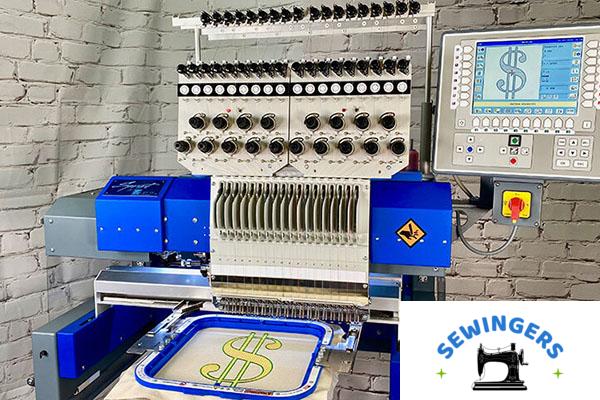
Multi-needle machines are built for volume and complexity. With multiple needles pre-threaded in different colors, they switch automatically during a design. They’re faster, handle larger fabric pieces, and produce multicolored work far more efficiently. The downside is cost, size, and a steeper learning curve. These machines take up real workspace and typically start at several thousand dollars. They’re the workhorses for anyone planning to scale beyond a handful of orders per week.
Which type fits depends entirely on projected volume, the complexity of designs you plan to offer, and how quickly you need to fulfill orders. Many home business owners start with a single-needle machine and upgrade once the order flow justifies the investment.
Factors to Consider When Choosing an Embroidery Machine
Design and Stitching Capability
This is the non-negotiable starting point. The machine needs to handle the complexity of designs you plan to sell — fine detail, smooth curves, clean lettering. Stitching speed matters too, but not at the expense of quality. A machine that stitches fast but produces messy results creates more rework than it saves in time.
Hoop Size and Compatibility
Hoop size determines the maximum design area for a single hooping. A 5×7 inch hoop covers most standard projects, but larger items (jacket backs, quilt blocks) need bigger hoops. Check whether the machine supports multiple hoop sizes and what’s included versus sold separately.
Connectivity and Transfer Options
Getting designs from your computer to the machine shouldn’t be a hassle. USB connectivity is standard on most modern machines. Some offer Wi-Fi or direct computer connection. Compatibility with common design software formats (PES, DST, JEF) is worth verifying before purchase.
Ease of Use and Maintenance
Look for clear controls, a readable display, and straightforward threading. Machines that fight you on basic setup eat into productive time. Accessible bobbin areas and simple cleaning procedures matter more than they seem on day one — by month three, you’ll notice.
Cost and Warranty
Home embroidery machines range from roughly $300 to over $10,000. The sweet spot for most startups sits between $500 and $2,000. A solid warranty (at minimum one year, ideally longer) provides real protection on what’s essentially the most expensive piece of equipment in the business.
Top Embroidery Machines for Home Business
Here’s a comparison table for quick reference:
| Machine | Stitches | Speed (spm) | Weight (lbs) |
|---|---|---|---|
| Brother SE1900 | 240 | 850 | 38.5 |
| Singer Futura XL-550 | 215 | 550 | 23 |
| Janome MB-4S | 4 | 800 | 73 |
| Brother PE770 | 136 | 650 | 27 |
| Janome MC14000 | 350 | 1000 | 62.8 |
| Janome MC12000 | 100 | 1000 | 71.6 |
| Brother SE1800 | 184 | 650 | 39.5 |
| Singer Futura XL400 | 30 | 400 | 23 |
| EverSewn Sparrow X | 100 | 850 | 30 |
| CamFive EMB HT1501 | 100 million | 1200 | 551 |
Brother SE1900
The SE1900 is one of Brother’s stronger entries for home-based embroidery. It packs 138 built-in embroidery designs, 240 stitch functions, automatic needle threading, and a drop-in top bobbin. You also get 10 auto-size buttonhole styles and 11 monogramming options.
What works well: Impressive stitch variety, jam-resistant bobbin, full-color LCD touchscreen, spacious 5×7 inch embroidery area, USB port for importing designs, and bright LED workspace lighting.
What doesn’t: It runs loud during operation, and the mainframe is plastic — which raises durability questions for heavy daily use.
Singer Futura XL-550
A dual-function sewing and embroidery machine with 215 built-in stitches, 125 embroidery designs, automated thread cutting, built-in memory, USB port, 5 lettering fonts, and LED workspace lighting. It runs on 110V only.
What works well: Good variety of designs and stitch patterns, useful automated functions, handles diverse fabric types, and serves as both a sewing machine and embroidery unit.
What doesn’t: The 110V limitation restricts it to North American users. Some owners report inconsistent embroidery function performance.
Janome MB-4S
This is a commercial-grade machine in a home-business-friendly package. It features a 5.7-inch remote screen, automated thread cutter, 4 LED work lights, and an extra-large bobbin. Runs on 110V only.
What works well: Large bobbin simplifies threading, generous work area, convenient automated functions, and the screen makes pattern selection intuitive.
What doesn’t: Limited to 110V (North America), and stitch pattern variety is relatively thin compared to competitors.
Brother PE770
A popular dedicated embroidery machine featuring a 5×7 inch work area, 136 built-in designs, 650 spm top speed, and USB design import.
What works well: Easy design importing, solid variety of built-in patterns, simple threading and operation, and a “My Custom” feature for creating original stitch patterns.
What doesn’t: Struggles with larger projects, and the plastic mainframe feels flimsy under sustained use.
Janome MC14000
A multi-function powerhouse with 350 built-in embroidery designs, a generous 9.1×11.8 inch embroidery area, monogramming functions, 13 one-step buttonholes, automatic thread tension, and automated needle threader.
What works well: That embroidery area is genuinely large, extensive stitch and design library, automation features smooth out the workflow, includes a knee-lifter, and the full-color LCD simplifies selection.
What doesn’t: It’s expensive. And beginners might find the learning curve steep.
Janome MC12000
A heavy-duty machine featuring advanced computer connectivity, a stitch composer, linear embroidery system, quilting function, and AcuFeed Flex system.
What works well: True multi-function capability, straightforward operation despite its size, durable construction, and handles a range of fabric types.
What doesn’t: Heavy and bulky — not something you’re moving around easily. Also on the expensive side.
Brother SE1800
Part of Brother’s SE series, this dual-function machine offers a 5×7 embroidery field, 184 sewing stitches, 136 embroidery designs, 11 sewing feet, 6 lettering fonts, and a color LCD screen.
What works well: Strong variety of stitches and designs, built-in memory, comes with a wide range of sewing accessories, and is genuinely beginner-friendly.
What doesn’t: Plastic mainframe again. And embroidery software has to be purchased separately — that’s an added cost many don’t anticipate.
Singer Futura XL400
Features 30 built-in stitch patterns, 125 embroidery designs, 2-step buttonholes, drop-feed bobbin, free-motion sewing arm, LED lighting, and automated needle threading.
What works well: Decent embroidery design variety, versatile across different project types, accessible for beginners, and the free-arm makes seams and cuffs easier.
What doesn’t: Bobbin tension can be finicky. The embroidery software doesn’t support Mac OS — a real limitation for many users.
EverSewn Sparrow X
Runs at 850 rpm with 100 built-in embroidery designs, smart device connectivity, built-in thread cutter, one-step buttonhole, adjustable presser-foot pressure, and automatic threading.
What works well: The adjustability makes it approachable, it’s durable and fast, versatile across project types, and offers good stitch variety.
What doesn’t: The instruction manual leaves a lot to be desired. Bobbin jamming is a recurring complaint from users.
CamFive EMB HT1501
The heavyweight of this list. A commercial-grade single-head machine running at 1,200 spm with a 22×14 inch embroidery area, massive design library (100 million stitches), large LCD panel, and USB port.
What works well: Extremely powerful performance, enormous stitch library, that embroidery area is hard to match, and it’s built to last.
What doesn’t: Expensive. Not for beginners. At 551 pounds, portability is nonexistent.
Any of these machines can anchor a home embroidery business — the right choice depends on your budget, projected volume, and the types of projects you plan to take on. The machine cost represents the biggest startup expense, so that comparison table is worth studying carefully.
Embroidery Machine Accessories and Supplies
The machine gets all the attention, but supplies determine the quality of finished work just as much.
Thread and bobbins — You need quality embroidery thread in a range of colors. Cheap thread breaks, shreds, and produces dull results. Rayon and polyester are the two main types: rayon has a nicer sheen but polyester holds up better to washing and sun exposure. Stock extra bobbins so color changes don’t stall production.
Needles — Embroidery needles differ from regular sewing needles. They have a larger eye and a specially shaped scarf to handle embroidery thread without shredding it. Different sizes and types suit different fabrics and design densities. A 75/11 needle works for most standard projects, but heavier fabrics need something sturdier. Having the right needle for the job prevents skipped stitches and fabric damage.
Stabilizers — These support the fabric during stitching to prevent stretching and distortion. Tear-away stabilizers work well for stable woven fabrics. Cut-away provides permanent support for knits and stretchy materials. Water-soluble types dissolve after stitching and work great for freestanding lace or sheer fabrics. Getting the stabilizer wrong is one of the most common mistakes new embroiderers make — and it shows in the finished product.
Software and designs — Embroidery software lets you create custom designs or modify existing ones. Programs range from free basic editors to professional digitizing suites costing several hundred dollars. There are also online marketplaces selling pre-made design files if custom digitizing isn’t in the skill set yet. Most machines come with some built-in designs, but you’ll outgrow those quickly once orders start coming in.
Scissors and cutting tools — Sharp, precise cutting tools for trimming threads and excess stabilizer. Dull scissors create messy finishes. This seems minor until you’re trimming jump threads on your fiftieth piece of the day. A good pair of curved-tip embroidery scissors and a decent set of fabric shears cover most needs.
Embroidery Machine Maintenance and Troubleshooting
Regular maintenance keeps machines running and prevents expensive repairs.
Cleaning and lubrication — Lint and thread fragments accumulate around the bobbin area and feed dogs surprisingly fast, especially when working with fuzzy fabrics or doing high-density stitching. Regular cleaning (after every few projects, roughly) prevents buildup that causes skipped stitches or tension issues. A small brush and compressed air do the job. Lubricate moving parts per the manufacturer’s schedule — some machines are self-lubricating, others need periodic oiling.
Needle and thread replacement — Dull or bent needles cause thread breaks and poor stitch quality. Replace needles regularly — not just when they break. A good rule of thumb is a fresh needle every 8-10 hours of stitching time. Thread quality degrades over time too, especially if stored in humid or sunny conditions. Old thread becomes brittle and snaps more easily.
Tension adjustment — Proper thread tension produces even, balanced stitches. When the top thread shows on the back or the bobbin thread pulls to the front, tension needs adjusting. This is one of those things that seems intimidating at first but becomes second nature. The machine manual covers the specifics for each model, and small adjustments usually solve the issue.
Common troubleshooting — Thread breakage, needle jams, and design alignment errors are the most frequent issues. Most have straightforward fixes: rethreading, cleaning the bobbin area, checking needle condition, or re-hooping fabric. The machine manual is the first resource; online embroidery communities and forums are the second. Chances are someone else has already encountered and solved whatever problem you’re facing.
Conclusion
Choosing an embroidery machine for a home business comes down to balancing design capability, hoop size, connectivity, ease of use, and budget. The machines reviewed here span from entry-level options like the Brother PE770 to commercial-grade units like the CamFive EMB HT1501. There’s no single “best” machine — only the best machine for a particular situation and set of needs.
Beyond the machine, plan for ongoing costs: thread, needles, stabilizers, software, and maintenance supplies. These recurring expenses are modest individually but add up over time. Build cleaning and upkeep habits early — they protect the investment and keep output quality consistent. A well-maintained entry-level machine will outperform a neglected expensive one every time.
For anyone on the fence about starting, the honest assessment is this: the learning curve is real but manageable, the initial investment is reasonable compared to most small businesses, and the market for personalized embroidered products continues to grow. The hardest part is usually just picking the machine and getting started.
FAQs
What’s the difference between single-needle and multi-needle embroidery machines?
Single-needle machines use one thread color at a time, requiring manual changes between colors. Multi-needle machines hold multiple pre-threaded colors and switch automatically. Multi-needle units are faster and handle larger fabric, but cost significantly more.
What features matter most when buying an embroidery machine?
Design and stitching capability, hoop size options, connectivity for transferring designs, ease of use and maintenance access, and the warranty. Budget obviously plays a role, but skimping on core functionality usually costs more in the long run.
What accessories are needed to start embroidering?
Thread and bobbins, embroidery-specific needles, stabilizers, design software or pre-made design files, and sharp cutting tools. Most machines include some starter supplies, but you’ll need to expand the collection quickly.
How should an embroidery machine be maintained?
Clean lint and debris regularly, lubricate per manufacturer instructions, replace needles before they cause problems, and keep thread properly stored. Learning basic tension adjustment saves a lot of frustration.
How are designs transferred to the machine?
Most machines accept designs via USB drive. Some support Wi-Fi transfer or direct computer connection. Design files need to be in a format compatible with the specific machine (PES, DST, JEF, etc.).
Can custom designs be created for machine embroidery?
Yes — with compatible digitizing software. There’s a learning curve to digitizing, but it opens up the ability to offer truly custom work rather than relying on stock designs.
What’s the difference between stabilizers and hooping?
Stabilizers are material placed behind (or on top of) fabric to support it during stitching. Hooping is the process of securing fabric in the embroidery frame. They serve different functions but work together — proper hooping with the right stabilizer produces clean results.
Can regular sewing thread be used for embroidery?
Not recommended. Sewing thread isn’t designed for the stress and density of embroidery stitching. It breaks more easily, produces duller results, and doesn’t hold up to repeated washing the way proper embroidery thread does. Embroidery-specific thread — whether rayon or polyester — is worth the small extra cost per spool.
How long do embroidery machines typically last?
With consistent maintenance, a quality embroidery machine can last 10-20 years or even longer. Frequency of use, the complexity of projects, and how well the machine is cleaned and serviced all affect lifespan. Commercial-grade machines built with metal frames tend to outlast consumer models with plastic components, which is something to factor into the initial purchase decision.